Latest Games :

SHEKHAR BHALERAO

Showing posts with label COMPUTER TRICKS. Show all posts

Earn Free $$ From Adf.ly - Without Software

Friday, 1 November 2013 | 0 comments

Earn Free $$ From Adf.ly - Without Software


Dear Visitors here is very simple and working method to hack adf.ly. Using this adf.ly hack you can easily earn few dollars. This adf.ly hack can be used only in Mozilla Firefox. Because this trick is based two very simple addons which are currently availabe for mozilla only. By using this addons you can earn from adf.ly by doing almost nothing.

Earn $30/day From Adf.ly - Easy Adf.ly Hack

Before jumping on steps lets have look on the two addons which you have to use and what they are generally used for.

Addons To Use For Adf.ly Hack

ipFlood - ipFlood generates random IP according to the settings you define and uses them to fake the use of a proxy. It will allow you to be fully anonymous. It will change you ip everytime you refresh.
Auto refresh - Auto Refresh will refresh or hard refresh any tab or group of tabs at individual or group intervals.

Steps To Use Easy Adf.ly Hack

●First download the addons from below mentioned links
Download ipFlood
Download Auto refresh
●Now after downloading the addons restart your firefox
●Open any of your adf.ly links, after then right click and select auto refresh >every 10 seconds.
●According to your Internet connection speed you can do this in 4-6 tabs simultaneously and leave it for few hours. [More tab + More hours = More money]
●After doing these steps go have a cup coffee an let these addons do their work for you.
●Enjoy using this simple adf.ly hack!

Kindly Share this post with your friends if it helped you.
Hope you enjoy using this hack visit daily for more adfly hacks.
Continue Reading

Sony Vegas Pro Video Editing 11.0.682 Full x86

Saturday, 26 October 2013 | 0 comments

Sony Vegas Pro Video Editing 11.0.682 Full x86


Precise editing tools 

Edit SD, HD, or 3D video with drag-and-drop functionality, extensive editing tools, and incomparable video effects. Features include stereoscopic 3D support, multicamera editing, 32-bit floating-point video processing, video stabilization, customizable window layouts, HDV/ AVCHD/ RED/ SDI/ XDCAM/ HDCAM SR support, and A/V synchronization detection and repair. 

GPU Accelerated Performance 

Working with OpenCL™ supported devices from AMD and NVIDIA, Vegas Pro 11 leverages GPU acceleration for video FX, transitions, compositing, pan/crop, track motion and encoding, providing a significantly faster workflow. The addition of GPU acceleration streamlines the video editing experience in Vegas Po 11 by providing playback performance gains and faster rendering times, ideal for industry professionals who work on tight deadlines where every second counts. 

Stereoscopic 3D editing 

Create breathtaking stereoscopic 3D projects with the same ease and agility as the Vegas Pro 2D workflow. Vegas Pro 11 provides the ability to easily import, adjust, edit, preview, and output stereoscopic 3D media — all using industry-standard professional delivery formats including single or dual files with side-by-side, top/bottom, or line-alternate encoding. Anaglyphic monitoring and output are also supported. 

NewBlue Titler Pro 

Create 3D titles with Titler Pro, an exceptional new titler from NewBlueFX. Titler Pro enables users to add animations, professional-style templates, and effects to their titles. Work in real-time with GPU-accelerated effects and transitions and easily move text on the X, Y, and Z axes, all within the Vegas Pro 11 workspace. Titler Pro is the perfect addition to the stereoscopic 3D toolset. 

Superior audio control 

Access unlimited audio tracks, 24-bit/192 kHz audio, punch-in recording, 5.1 surround mixing, effects automation, and time compress/expand, while applying customizable, real-time audio effects like EQ, Reverb, Delay, and more. Expand your audio processing and mixing options with supported third-party VST audio plug-ins. Use the Mixing Console for precise audio control. 


Powerful Blu-ray Disc™ authoring
 

Burn movies to Blu-ray Disc™ directly from the Vegas Pro 11 timeline for high-definition delivery. Use DVD Architect Pro software (included with the Vegas Pro 11 collection) to author DVDs or Blu-ray Discs with subtitles, multiple languages, and numerous playback menus. Preview and test your work in real time. Apply Brightness and Contrast, Crop, and Anti-Flicker filters. Add high-quality preset backgrounds and themes to add life to any project. Set CSS and Macrovision® copy-protection flags for masters. 

Professional 32- and 64-bit workflow 

The Vegas Pro 11 interface provides a fully customizable workspace for accomplishing a wide range of production requirements. Dock multiple windows across multiple monitors and save your layouts to fit specific editing tasks. Nest Vegas Pro projects within the timeline, customize and save keyboard commands, and use application scripting to automate repetitive tasks. 

Changes and fixes on this update 

Fixed a crash that could occur on some computers during playback if the Split Screen View was used in the Clipboard mode. 
Fixed a crash that could occur when right-clicking the Pan/Crop ruler. 
Fixed a crash that could occur opening certain FLAC files. 
Fixed a crash or hang that could occur when switching between Video FX and Compositors windows with certain OFX plug-ins. 
Fixed a hang that could occur with Spiral, Split, Squeeze, and Zoom transitions on certain NVIDIA GPUs. 
Fixed the ability render more than 4 channels of audio to Sony MXF format. 
Fixed an issue that could cause garbled audio in the rendered file if the last playback direction was reverse. 
Re-enabled GPU acceleration of Cookie Cutter (Video FX) and Page Loop (Transition) on AMD GPUs when running Catalyst 12.2 or newer. 
Fixed an error message that would appear when writing to theSony XDCAM Professional Media Station (XDS) internal drive from Vegas. 

Microsoft® Windows Vista® 32-bit or 64-bit SP2, or Windows 7 32-bit or 64-bit 
2 GHz processor (multicore or multiprocessor CPU recommended for HD or stereoscopic 3D) 
500 MB hard-disk space for program installation 
2 GB RAM (4 GB recommended) 
OHCI-compatible IEEE-1394DV card (for DV and HDV capture and print-to-tape) 
USB 2.0 connection (for importing from AVCHD, XDCAM EX, NXCAM, or DVD camcorders) 
Windows-compatible sound card 
DVD-ROM drive (for installation from a DVD only) 
Supported CD-recordable drive (for CD burning only) 
Supported DVD-R/-RW/+R/+RW (for DVD burning only) 
Supported BD-R/-RE drive (for Blu-ray Disc™ burning only) 
Microsoft .NET Framework 3.5 SP1 (included on application disc) 
Apple® QuickTime® 7.1.6 or later for reading and writing QuickTime files 
Internet Connection (for Gracenote MusicID Service) 

Sony Vegas Pro 1

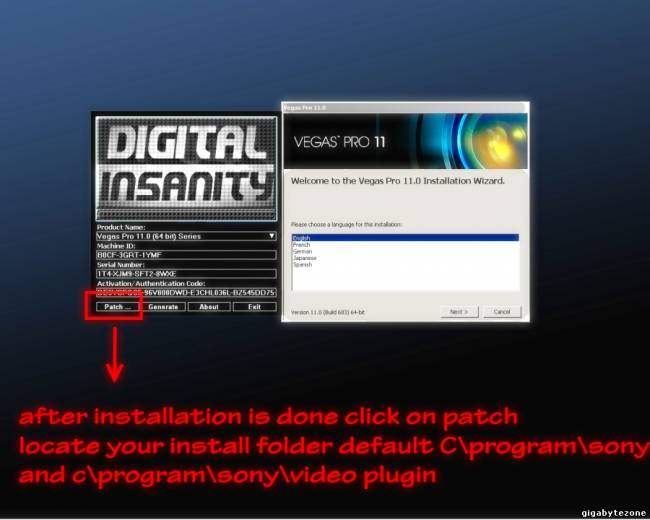
1. Extract vegaspro11.0.683_64bit_full.rar file by right-clicking and hitting the Extract Here option, you can use WinRAR, 7-Zip and any other archiving/extracting programs! 

2. Run the setup to install. 

3. Now open Keygen/Patch and genarate serial. 

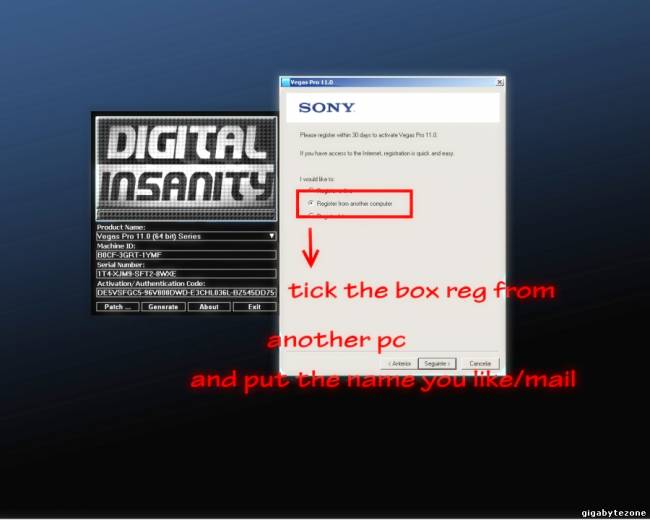
4. Choose Activate from another pc and enter the name you whant and any email and country 

5. Now copy the Activation code 

6. That's it! Done. 

OR FOLLOW THE IMAGES BELOW 

good luck, enjoy and seed! 

Sony Vegas Pro 1

Sony Vegas Pro 1

Sony Vegas Pro 1

Sony Vegas Pro 1

Sony Vegas Pro 1

Sony Vegas Pro 1


File Size:
202.97 MB

Info Hash:
B4E882B5AD1BEB5315F5E8E11DFAC564069CBB6Dhttp://fr33dom.h33t.com:3310/announce

udp://fr33domtracker.h33t.com:3310/announce


download arrow
                                                                        Download

       You will need a ( uTorrent) (16.3Kb)  Download uTorrent


Continue Reading

All In One Password Unlocker 5.5.147 Free Downlaod

| 0 comments

All In One Password Unlocker 5.5.147 Free Downlaod


password unlocker bundle


All in one pack contains : 
• RAR Password Unlocker 
• ZIP Password Unlocker
• Word Password Unlocker 
• Excel Password Unlocker
• PowerPoint Password Unlocker 
• PDF Password Unlocker
• Recover passwords for IM, Emails and websites in IE 
• Outlook Password Unlocker
• Outlook Express Password Unlocker
• Internet Explorer Password Unlocker 
• IM Password Unlocker 
• Recover passwords for databases
• MS SQL Password Unlocker
• Access Password Unlocker
• Remove Windows administrator password and user passwords 


Continue Reading

Convert PDF files into Word Document easily with Very pdf2word V3.0

| 0 comments

Convert PDF files into Word Document easily with Very pdf2word V3.0 

Whenever you want to convert any PDF file into a text or word format you should need to use a PDF editor tool or a converter. And you have to pay some dollars to get those software from internet.
PDF 2 Text converter

Here I m telling you about a PDF to Word converter software named Very PDF2Word V3.0. Price of this software is $40, if you want to download it from their Homepage. Don’t worry; I’ll give you a keygen with this software. So that you will be able to use it free forever.

PDF2Word(PDF to word) software enable export the text, images and other contents from PDF document into word document, so you can reuse your PDF content, PDF to Word software will preserving text, layout and bitmap images in the generated word document.

Note: PDF2Word(PDF to word) software is a standalone program and does not require Microsoft WordAdobe Acrobat, or even Acrobat Reader.
PDF 2 Text converter
Key features of this software:

    * Convert PDF files into Microsoft Word documents;
    * Batch PDF to Word conversion - convert multiple documents at once;
    * Standalone software, MS Word, Adobe Acrobat and Reader NOT required!
    * Support Command Line Operation (for manual use or inclusion in scripts);
    * Support Win98/ME/NT/2000/XP/2003/Vista platforms;
    * Automatically resize PDF page to fit your required Word page size;
    * Accurately preserve text, pictures, and layout of the original PDF;
    * PDF to Word is easy to use;
    * Support multiple documents conversion (Batch Processing);
    * Support drag and drop PDF files for conversion;
    * Support PDF1.6 file format (formerly supported only by Adobe Acrobat 7.0);
    * Converted files can be automatically loaded immediately after conversion is complete;
    * Support page range conversion (all, from-to, individual pages);
    * Support English, French, German, Italian, Chinese Simplified, Chinese Traditional, Czech, Danish, Dutch, Japanese, Korean, Norwegian, Polish, Portuguese, Russian, Spanish, Swedish, etc. languages;
    * Support deletion of graphics and pictures from the generated Word document;
    * Support encrypted PDF file conversion;
    * Five reconstruction modes for PDF to Word conversion;
    * Convert PDF file to flowing MS Word document without text boxes;

Download with keygen and enjoy... [pass: topone2u]


Continue Reading

Hack any LAN or Wi-Fi Connected Computer Using 'Cain & Abel' Sniffer Tool!

| 0 comments

Hack any LAN or Wi-Fi Connected Computer Using 'Cain & Abel' Sniffer Tool! 


Do you know what you are typing when using internet is passing through the same network that someone else using! So, he can easily hack your information using some kind of network sniffing software and analyzer. Now doesn’t matter this is Wi-Fi or LAN.

Hack user information by sniffing network is a very popular hacking technique since then. Hackers call this technique ‘Man in Middle Attack’.
WiFi Scanner

What you can get by sniffing a network?
Wi-Fi hotspot password
Browser saved password
Email password
Browsing session history
And data uses information

Tools to be used to sniff a network:

How to Start Sniffing a Network:
Step 1: First of all find your won IP, MacDNS info etc from this direction: ctrl+r > cmd > ipconfig/all.
Step 2: Install Cain & Able and open the program. Click start sniffer icon and select your network adapter.
applying Ethernet adapter for sniffer
Step 3: Click start sniffer icon to active sniffer and right click from anywhere in the blank space then click Scan Mac Address. You have started getting IP and Mac addresses from your network.
scanning for mac address fro sniffing
Step 4: To select your targeted IP click Add button and select your gateway from left and targeted IP from right.
fix the targeted IP to start sniffing
Step 5: Now start poisoning your targeted IP by clicking this following button. Once you start this tool you should started getting your targeted computer data as some individual packets and every packets will have some user data information. Packets would be likely 5-10 Mb.

start attacking with sniffer
Step 6: Install and open Wireshark Network Analyzer to break the packets and find the information in plain text.

Note: In this process ‘Namp’ is an optional tool. It will give you extra advantage if you use it to find Host names or Mac address from a LAN.

Still confused? Don’t worry. Let me know your problem and I’ll get back to you!

Continue Reading

7 Ways to Child Proof a Computer

Tuesday, 8 October 2013 | 0 comments

7 Ways to Child Proof a Computer


I have a 2 year old daughter and I have realized the importance of child-proofing my computer! The second I turn around, she runs to my desk, jumps on the chair and starts banging away at the keys. If the computer is already on, she has figured out how to move the mouse and click on anything she can. It’s great fun for her, but a major headache for me.

I didn’t really think she could do anything, but apparently randomly pressing a bunch of keys on the keyboard can accomplish a lot more than you think! My daughter sent emails, deleted folders, opened programs, and even moved files with her keyboard slamming. In this article, I’ll talk about a few ways you can child-proof your computer and hopefully save yourself some grief. If your kids are older, I’ll also give you some tips for them too!
Method 1 – Lock Your Computer

This simple option solved most of my problems with my daughter. If the computer was off and she slammed the keys, it would turn on, but remain on the locked screen. Thankfully, she’s too small to enter a password just yet


Before my computer goes to sleep, the screen saver usually comes on. I also enabled the password on the screen saver in case she gets to it before the computer sleeps. I have my computer sleep after about an hour, so there are a lot of times when the screen saver is on.
Method 2 – Use a Limited Account or UAC

The first method only works for really young toddlers, not with kids that are older than 3. By that age, they will probably scream and yell until you let them on the computer. At this point, you need to give them access to the computer so they can play games or do whatever, but also make sure they can’t do anything else


One way to do this is to use a locked down user account. You can use the Guest account in Windows, which has limited user rights across the system. The Standard user account still has a lot of permissions and can do quite a bit. The guest account is disabled by default, but you can enable it and it prevents the user from installing software, changing settings, etc.

Another feature in Windows is UAC (User Account Control). You can set this to the highest setting and any standard user account will have to enter a password in order to complete the task. UAC pops up quite a bit if you  have it set to the highest setting, so those users will not be able to change most of the settings on the computer


Method 3 – Parental Controls

Windows 7 and Windows 8 have built-in parental controls that let you restrict the programs that can be run on the computer, the time the computer can be used and even filter web sites the user can visit


You can Google on how to enable Parental Controls and this may suit your needs. It’s not total protection, but it can help you control what can be done on the computer. If you are worried about data being deleted or getting a virus, this method won’t work very well.

There is also a feature in Windows 7 (not the Home version) called AppLocker that prevents programs from being run. You can basically choose which programs you want to allow to be run and the user will only be able to open those programs. You can learn about AppLocker here.
Method 4 – Group Policy

Parental Controls is nice, but if you want access to a ton more rules and restrictions, you’ll have to familiarize yourself with group policy. You can restrict access to drives, restrict access to the Control Panel, remove tabs from IE options dialog, restrict access to the registry, command prompt or task manager, prevent users from deleting browsing history, and all kinds of other stuff. Group policy can control every aspect of Windows, so you can really lock down a computer hardcore by using it. To get to the local group policy for a PC, just type gpedit.msc when you click on the Start button
image---------------------------------------------------------------------------------------------
If you are running Windows 7 Home or Starter, you won’t be able to use local group policy settings. Unfortunately, it only works on Windows 7 Pro, Ultimate and Enterprise. If you have any of these versions, it’s super useful for locking down a PC. There are a ton of articles online that explain how to use local group policy, so have fun!
Method 5 – Encryption

If you’re looking for a way to keep your data safe, you may want to look into creating a secure encrypted container on your system. You can do this using a program called TrueCrypt. It’s a free program that has been around for a long time and does an amazing job.


If you have important files you don’t want anyone to access or accidentally delete, you can create a encrypted container that you can mount to the system only when you need to use it. Otherwise, it doesn’t even show up on the system. The HowToGeek has a great guide on getting started with TrueCrypt that explains how to do this.
Method 6 – Deep Freeze It

There is this amazing program for IT people called Deep Freeze, which is about $35, but is something that a lot of parents would love. Maybe you don’t care about setting up parental controls or learning group policy or encrypting your hard drives, etc, etc. What if you could let your kids do anything to the computer: delete files, change settings, install crapware, download viruses, etc and then magically get everything the way it was with a restart


Deep Freeze does exactly that. It’s absolutely awesome. A lot of companies and schools use this software because you can setup your system the way you want, let users wreak havoc, and then simply restart the computer to get it back to the original state. They can literally delete system files and it won’t matter. If you want need something like that, then buy this software. I’ve used it myself and it works amazing well. Read more about it on their site.
Method 7 – Install Another OS

One method I use to make sure guests coming over to my house don’t access my personal files or mess up my system is to install another copy of Windows on the same PC. You probably have some old computer running XP or something, so just install a dual boot system with your main OS and a secondary OS that you can boot up to for other users.

I have a Windows 7 machine that also has Windows XP installed along with Deep Freeze. Firstly, there are no perosnal files or programs on XP other than the basic stuff. Even if someone does something or installs a program, etc, I just restart it and I’m back to my clean install of Windows XP. Of course, you need to get another copy of Windows, but if you don’t have a copy, then just use Linux!

I also have Ubuntu installed and that’s totally free. You can even download a specific flavor of Ubuntu that matches the style of Windows, so users won’t be disoriented if they have never seen Linux before.

Those are seven quick tips that I’ve used in the past to secure my computers from children, nosy people and everyone else. How do you child-proof your computer? Let us know in the comments. Enjoy!
END///////////////////////////////////////////////////////////////////////////////////////////////
Continue Reading

Change the Start Button Text in Window XP

| 0 comments

Change the Start Button Text in Window XP


Stage 1:

Create a system restore point just incase if something goes wrong you can roll back to the primary settings. Make a back up copy of explorer.exe in a safe place, maybe in a different folder. aa 

Stage 2:


You would need to download a small freeware utility called Resource Hacker. "Resource HackerTM is a freeware utility to view, modify, rename, add, delete and extract resources in 32bit Windows executables and resource files (*.res). It incorporates an internal resource script compiler and decompiler and works on Win95, Win98, WinME, WinNT, Win2000 and WinXP operating systems." excerpt from Resource Hacker's Website


Click here to download Resource Hacker


Step 3:

Open Resource Hacker utility. Click on File ---> Open. Type "explorer.exe" in the text box.


Step 4:

Expand String Table --->  37 from the tree view and click on 1033 as shown in the figure below


Step 5:

From the right window next to where start is written in front of 578 edit the text to what you want on your start button. For example I edited it to Wintipz as shown in the figure below:


Step 6:


Click on the "Compile Script" button on top of the right window. Now click on File ---> Save as ----> wintipz.exe as shown in Figure Below:


Step 7:
Open registry editor by clicking on Start ---> Run and typing "regedit" at the text box. Navigate to HKEY_Local_Machine -> Software -> Microsoft -> Windows NT -> CurrentVersion -> Winlogon

From the right pane double click on shell and replace "explorer.exe" with "GDDon.exe" as shown in figure below and then exit registry editor:


Step 8: Restart your computer to see the changes.

Continue Reading

Make Mozilla Firefox 30-100 times faster!

Thursday, 26 September 2013 | 0 comments

Make Mozilla Firefox 30-100 times faster!

www.hackyshacky.com


 Here a tweak which i found while surfing net....i Hope this is useful for you to make your firefox faster ! :)

1. Type "about:config" in the address bar of mozilla and hit return. Scroll down and look for the following entries:


network.http.pipelining

network.http.proxy.pipelining

network.http.pipelining.maxrequests


Normally the browser will make one request to a web page at a time.

When you enable pipelining it will make several at once, which really speeds up page loading.


2. Alter the entries as follows:


Set "network.http.pipelining" to "true"


Set "network.http.proxy.pipelining" to "true"

Set "network.http.pipelining.maxrequests" to some number like 30/40/80/100. This means it will make 30/40/80/100 requests at once.


3. Lastly right-click anywhere and select New-> Integer.

Name it "nglayout.initialpaint.delay" and set its value to "0".

This value is the amount of time the browser waits before it acts on information it recieves.


If you're using a broadband connection you'll load pages 2-100 times faster now.~! :)
Continue Reading

Increase IDM Download Speed using IDM Optimizer

| 0 comments

Increase IDM Download Speed using IDM Optimizer


idm-optimizer-tool
Internet Download Manager as we said is the best download manager right now available as compared to any other download manager like DAP, Microsoft Lightweight Download Manager, Orbit and many others. Well we just got our hands on IDM Optimizer, it’s a small utility which boosts your IDM speed by modifying some registry entries like it will change Connection Speed, Connection type, Max Connection Numbers and some other few entries. So this is what above kind of Window you will see when you will fire up the IDM Optimizer software. So it has a simple Maximize Now button which when clicked will popup a note to restart IDM so that it can take effect. Well you can see it also has a Restore Default button which will restore all the settings which IDM came with you can use that if you think that you are not getting good speeds.
  1. Download   IDM Optimizer Tool
  2. Now make sure IDM is installed on your PC, as this tool will only optimize IDM if its physically present on your system.
  3. Now just fire up your IDM Optimizer and than you will see window like above just click on Maximize Now and you will get a note asking you to restart your IDM do that and once restart your PC.
  4. That’s it now your IDM is boosted with speed, try to download any file and check out if speeds are good or not.
  5. If you want to restore your default settings than you can click on Restore Default.
    That’s it guys now you have boosted your IDM with Speed, optimized it for faster downloads have fun :) and do share this post with all friends.
Continue Reading
 
Support : Creating Website | Johny Template | Mas Template
Copyright © 2011. SHEKHAR BHALERAO - All Rights Reserved
Template Modify by Creating Website
Proudly powered by Blogger